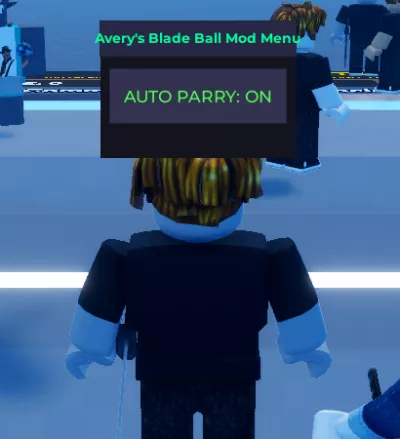
Avery's Blade ball auto parry script
8,597 views
Get auto parry blade ball and i have checked its working with xeno perfectly. just click the auto parry button to ON.


-- Avery's Blade Ball Auto Parry Mod Menu (Mobile) - March 2026
-- Auto clicks parry every time the ball is coming at you

getgenv().AutoParry = {
    Enabled = false
}

local Players = game:GetService("Players")
local RunService = game:GetService("RunService")
local VirtualInputManager = game:GetService("VirtualInputManager")
local LocalPlayer = Players.LocalPlayer

local Parried = false
local Cooldown = tick()

-- Simple Mobile Mod Menu GUI
local ScreenGui = Instance.new("ScreenGui")
ScreenGui.Parent = game.CoreGui
ScreenGui.Name = "AveryBladeBallMenu"
ScreenGui.ResetOnSpawn = false

local Frame = Instance.new("Frame")
Frame.Size = UDim2.new(0, 200, 0, 140)
Frame.Position = UDim2.new(0.5, -100, 0.4, -70)
Frame.BackgroundColor3 = Color3.fromRGB(20, 20, 30)
Frame.BorderSizePixel = 0
Frame.Active = true
Frame.Draggable = true
Frame.Parent = ScreenGui

local Title = Instance.new("TextLabel")
Title.Size = UDim2.new(1, 0, 0, 35)
Title.BackgroundColor3 = Color3.fromRGB(40, 40, 70)
Title.Text = "Avery's Blade Ball Mod Menu"
Title.TextColor3 = Color3.fromRGB(0, 255, 150)
Title.Font = Enum.Font.GothamBold
Title.TextSize = 16
Title.Parent = Frame

local ToggleBtn = Instance.new("TextButton")
ToggleBtn.Size = UDim2.new(0.9, 0, 0, 55)
ToggleBtn.Position = UDim2.new(0.05, 0, 0.35, 0)
ToggleBtn.BackgroundColor3 = Color3.fromRGB(50, 50, 80)
ToggleBtn.Text = "AUTO PARRY: OFF"
ToggleBtn.TextColor3 = Color3.fromRGB(255, 80, 80)
ToggleBtn.Font = Enum.Font.GothamSemibold
ToggleBtn.TextSize = 20
ToggleBtn.Parent = Frame

-- Toggle function
ToggleBtn.MouseButton1Click:Connect(function()
    getgenv().AutoParry.Enabled = not getgenv().AutoParry.Enabled
    ToggleBtn.Text = "AUTO PARRY: " .. (getgenv().AutoParry.Enabled and "ON" or "OFF")
    ToggleBtn.TextColor3 = getgenv().AutoParry.Enabled and Color3.fromRGB(80, 255, 80) or Color3.fromRGB(255, 80, 80)
end)

-- Main Auto Parry Loop (detects ball in front + perfect timing)
RunService.PreSimulation:Connect(function()
    if not getgenv().AutoParry.Enabled then return end

    local Ball = nil
    for _, b in ipairs(workspace.Balls:GetChildren()) do
        if b:GetAttribute("realBall") then
            Ball = b
            break
        end
    end

    local HRP = LocalPlayer.Character and LocalPlayer.Character:FindFirstChild("HumanoidRootPart")
    if not Ball or not HRP then return end

    local Speed = Ball:FindFirstChild("zoomies") and Ball.zoomies.VectorVelocity.Magnitude or 0
    local Distance = (HRP.Position - Ball.Position).Magnitude

    if Ball:GetAttribute("target") == LocalPlayer.Name and not Parried and Distance / Speed <= 0.55 then
        -- Simulate parry click (works on mobile)
        VirtualInputManager:SendMouseButtonEvent(0, 0, 0, true, game, 0)
        Parried = true
        Cooldown = tick()
    end

    -- Reset cooldown
    if Parried and (tick() - Cooldown) >= 1 then
        Parried = false
    end
end)

print("✅ Avery's Blade Ball Auto Parry Mod Menu loaded! Drag the GUI and tap to toggle ON.")
Blade Ball

Blade Ball

Blade Ball
Blade Ball

Blade Ball
Blade Ball
Boosting rockets this script to #1 on the homepage. A free account takes 30 seconds.
Log inGrab boosts and rocket your favorite scripts to the top — plus join the booster wall with the RGB ring.
⚡ Go Pro — 10 boosts/month + zero adsIt jumps to #1 in Recent Scripts and your avatar joins the booster wall.

Comments (1)
Log in to add a comment.
Dragonfirst
7 months ago
really bad, Above a certain speed (which isn't even high) it no longer reacts quickly enough and therefore you die.