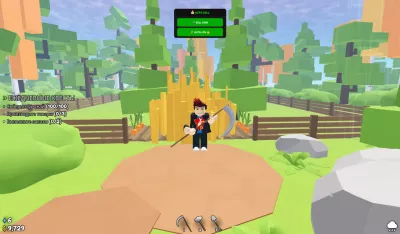
Farm It Auto Sell Script
1,063 views
Open source Auto Sell Script :] ( V1.0 )
USE IT WITH AUTO CLICKER FOR AFK FARM!


-- AUTO SELL SCRIPT
-- Change interval here (in seconds):
local SELL_INTERVAL = 0.1

local Players = game:GetService("Players")
local ReplicatedStorage = game:GetService("ReplicatedStorage")
local player = Players.LocalPlayer

-- Find the RemoteEvent
local inventorySell = ReplicatedStorage:WaitForChild("Events"):WaitForChild("InventorySell")

-- Create GUI
local screenGui = Instance.new("ScreenGui")
screenGui.Name = "AutoSellGUI"
screenGui.ResetOnSpawn = false
screenGui.Parent = player:WaitForChild("PlayerGui")

local frame = Instance.new("Frame")
frame.Size = UDim2.new(0, 250, 0, 140)
frame.Position = UDim2.new(0.5, -125, 0, 60)
frame.BackgroundColor3 = Color3.fromRGB(25, 25, 25)
frame.BorderSizePixel = 3
frame.BorderColor3 = Color3.fromRGB(0, 255, 0)
frame.Active = true
frame.Draggable = true
frame.Parent = screenGui

local corner = Instance.new("UICorner")
corner.CornerRadius = UDim.new(0, 10)
corner.Parent = frame

local title = Instance.new("TextLabel")
title.Size = UDim2.new(1, 0, 0, 35)
title.BackgroundColor3 = Color3.fromRGB(15, 15, 15)
title.Text = "💰 AUTO SELL"
title.TextColor3 = Color3.fromRGB(0, 255, 0)
title.Font = Enum.Font.SourceSansBold
title.TextSize = 18
title.Parent = frame

local titleCorner = Instance.new("UICorner")
titleCorner.CornerRadius = UDim.new(0, 10)
titleCorner.Parent = title

-- Sell Once Button
local sellButton = Instance.new("TextButton")
sellButton.Size = UDim2.new(0, 220, 0, 40)
sellButton.Position = UDim2.new(0.5, -110, 0, 45)
sellButton.BackgroundColor3 = Color3.fromRGB(0, 170, 0)
sellButton.Text = "🛒 SELL NOW"
sellButton.TextColor3 = Color3.new(1, 1, 1)
sellButton.Font = Enum.Font.SourceSansBold
sellButton.TextSize = 16
sellButton.BorderSizePixel = 0
sellButton.Parent = frame

local sellCorner = Instance.new("UICorner")
sellCorner.CornerRadius = UDim.new(0, 8)
sellCorner.Parent = sellButton

-- Auto Sell Button
local autoButton = Instance.new("TextButton")
autoButton.Size = UDim2.new(0, 220, 0, 40)
autoButton.Position = UDim2.new(0.5, -110, 0, 92)
autoButton.BackgroundColor3 = Color3.fromRGB(170, 0, 0)
autoButton.Text = "⚡ AUTO: OFF"
autoButton.TextColor3 = Color3.new(1, 1, 1)
autoButton.Font = Enum.Font.SourceSansBold
autoButton.TextSize = 16
autoButton.BorderSizePixel = 0
autoButton.Parent = frame

local autoCorner = Instance.new("UICorner")
autoCorner.CornerRadius = UDim.new(0, 8)
autoCorner.Parent = autoButton

local autoEnabled = false
local autoLoop

-- Sell function
local function sellInventory()
    inventorySell:FireServer()
    print("✅ Inventory sold!")
end

-- Sell once
sellButton.MouseButton1Click:Connect(function()
    sellInventory()
    sellButton.Text = "✅ SOLD!"
    sellButton.BackgroundColor3 = Color3.fromRGB(0, 255, 0)
    task.wait(0.5)
    sellButton.Text = "🛒 SELL NOW"
    sellButton.BackgroundColor3 = Color3.fromRGB(0, 170, 0)
end)

-- Auto sell toggle
autoButton.MouseButton1Click:Connect(function()
    autoEnabled = not autoEnabled

    if autoEnabled then
        autoButton.Text = "⚡ AUTO: ON 🔥"
        autoButton.BackgroundColor3 = Color3.fromRGB(0, 170, 0)

        autoLoop = task.spawn(function()
            while autoEnabled do
                sellInventory()
                task.wait(SELL_INTERVAL)
            end
        end)

        print("🔥 Auto sell enabled!")
    else
        autoButton.Text = "⚡ AUTO: OFF"
        autoButton.BackgroundColor3 = Color3.fromRGB(170, 0, 0)

        if autoLoop then
            task.cancel(autoLoop)
        end

        print("❌ Auto sell disabled")
    end
end)

print("💰 AUTO SELL LOADED | Interval: " .. SELL_INTERVAL .. "s")
+1 Assassin Leveling

Huss Valley

Cold War
Baddies
Build a Phone Empire
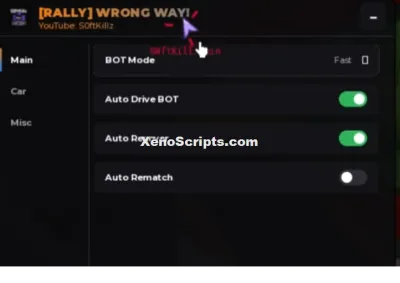
WRONG WAY
Boosting rockets this script to #1 on the homepage. A free account takes 30 seconds.
Log inGrab boosts and rocket your favorite scripts to the top — plus join the booster wall with the RGB ring.
⚡ Go Pro — 10 boosts/month + zero adsIt jumps to #1 in Recent Scripts and your avatar joins the booster wall.


Comments (0)
Log in to add a comment.