MYOLAN Hub Tactical Swat Simulator Script (No Keys) - Aimbot ON & ESP ON
2,857 views
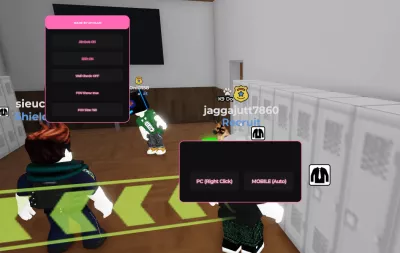
This keyless script is made by MYOLAN Hub for Tactical Swat Simulator roblox game and includes a number of functions related to PC (Right Click) & MOBILE (Auto) in the game.


local UserInputService = game:GetService("UserInputService")
local RunService = game:GetService("RunService")
local Players = game:GetService("Players")
local TweenService = game:GetService("TweenService")
local Camera = workspace.CurrentCamera
local LocalPlayer = Players.LocalPlayer

-- // Ayarlar
local Settings = {
    Aimbot = true,
    ESP = true,
    WallCheck = true,
    FOV = 150,
    ShowFOV = true,
    ThemeColor = Color3.fromRGB(255, 105, 180),
    DarkBg = Color3.fromRGB(15, 15, 15),
    ArmedColor = Color3.fromRGB(255, 0, 0),
    UnarmedColor = Color3.fromRGB(0, 255, 0),
    Platform = nil
}

-- // UI Helper
local function ApplySmoothDesign(obj, radius, hasStroke, strokeTransparency)
    local corner = Instance.new("UICorner", obj)
    corner.CornerRadius = UDim.new(0, radius)
    if hasStroke then
        local stroke = Instance.new("UIStroke", obj)
        stroke.Color = Settings.ThemeColor
        stroke.Thickness = 1.5
        stroke.Transparency = strokeTransparency or 0
    end
end

-- // Platform Seçim Ekranı
local SelectionGui = Instance.new("ScreenGui", game:GetService("CoreGui"))
local SelectionFrame = Instance.new("Frame", SelectionGui)
SelectionFrame.Size = UDim2.new(0, 320, 0, 160)
SelectionFrame.Position = UDim2.new(0.5, -160, 0.5, -80)
SelectionFrame.BackgroundColor3 = Settings.DarkBg
ApplySmoothDesign(SelectionFrame, 10, true)

local function CreatePlatformBtn(text, pos, platformType)
    local Btn = Instance.new("TextButton", SelectionFrame)
    Btn.Size = UDim2.new(0, 130, 0, 50)
    Btn.Position = pos
    Btn.Text = text
    Btn.BackgroundColor3 = Color3.fromRGB(25, 25, 25)
    Btn.TextColor3 = Color3.new(1,1,1)
    Btn.Font = Enum.Font.GothamSemibold
    Btn.TextSize = 14
    ApplySmoothDesign(Btn, 8, true, 0.4)
    Btn.MouseButton1Click:Connect(function()
        Settings.Platform = platformType
        SelectionGui:Destroy()
    end)
end

CreatePlatformBtn("PC (Right Click)", UDim2.new(0.08, 0, 0.5, 0), "PC")
CreatePlatformBtn("MOBILE (Auto)", UDim2.new(0.53, 0, 0.5, 0), "Mobile")

-- // Ana GUI
local ScreenGui = Instance.new("ScreenGui", game:GetService("CoreGui"))
local MainFrame = Instance.new("Frame", ScreenGui)
MainFrame.BackgroundColor3 = Settings.DarkBg
MainFrame.Position = UDim2.new(0.1, 0, 0.2, 0)
MainFrame.Size = UDim2.new(0, 220, 0, 280)
MainFrame.Visible = true
MainFrame.Active = true
MainFrame.Draggable = true
ApplySmoothDesign(MainFrame, 12, true)

local MainBg = Instance.new("ImageLabel", MainFrame)
MainBg.Size = UDim2.new(1, 0, 1, 0)
MainBg.BackgroundTransparency = 1
MainBg.Image = "rbxassetid://10149736922"
MainBg.ImageTransparency = 0.85
MainBg.ZIndex = 0
ApplySmoothDesign(MainBg, 12, false)

local Title = Instance.new("TextLabel", MainFrame)
Title.Size = UDim2.new(1, 0, 0, 35)
Title.BackgroundColor3 = Settings.ThemeColor
Title.Text = "MADE BY MYOLAN"
Title.TextColor3 = Color3.new(1,1,1)
Title.Font = Enum.Font.GothamBold
ApplySmoothDesign(Title, 10, false)

local function NewBtn(text, prop, pos, isCycle)
    local Btn = Instance.new("TextButton", MainFrame)
    Btn.Size = UDim2.new(0.85, 0, 0, 35)
    Btn.Position = UDim2.new(0.075, 0, 0, pos)
    Btn.BackgroundColor3 = Color3.fromRGB(25, 25, 25)
    Btn.TextColor3 = Color3.new(1,1,1)
    Btn.Text = text .. ": " .. (tostring(Settings[prop]))
    Btn.Font = Enum.Font.GothamSemibold
    ApplySmoothDesign(Btn, 6, true, 0.5)

    Btn.MouseButton1Click:Connect(function()
        if not isCycle then
            Settings[prop] = not Settings[prop]
            Btn.Text = text .. ": " .. (Settings[prop] and "ON" or "OFF")
            Btn.TextColor3 = Settings[prop] and Settings.ThemeColor or Color3.new(1,1,1)
        end
        local originalColor = Btn.BackgroundColor3
        Btn.BackgroundColor3 = Settings.ThemeColor
        TweenService:Create(Btn, TweenInfo.new(0.3), {BackgroundColor3 = originalColor}):Play()
    end)
    return Btn
end

NewBtn("Aimbot", "Aimbot", 50)
NewBtn("ESP", "ESP", 95)
NewBtn("Wall Check", "WallCheck", 140)
NewBtn("FOV Show", "ShowFOV", 185)

local fovBtn = NewBtn("FOV Size", "FOV", 230, true)
local sizes = {0, 50, 100, 150, 250}
local sIdx = 4
fovBtn.MouseButton1Click:Connect(function()
    sIdx = sIdx + 1
    if sIdx > #sizes then sIdx = 1 end
    Settings.FOV = sizes[sIdx]
    fovBtn.Text = "FOV Size: " .. (Settings.FOV == 0 and "Off" or Settings.FOV)
end)

-- // Logic
local FOVCircle = Drawing.new("Circle")
FOVCircle.Thickness = 1.5
FOVCircle.Transparency = 0.8
FOVCircle.Color = Settings.ThemeColor

local function HasTool(model)
    return model:FindFirstChildOfClass("Tool") ~= nil
end

local function GetTarget()
    local center = Vector2.new(Camera.ViewportSize.X / 2, Camera.ViewportSize.Y / 2)
    local closestDist = Settings.FOV
    local target = nil
    if Settings.FOV == 0 or not Settings.Aimbot then return nil end

    for _, obj in pairs(workspace:GetChildren()) do
        local hum = obj:FindFirstChildOfClass("Humanoid")
        local head = obj:FindFirstChild("Head")
        if hum and head and obj ~= LocalPlayer.Character and HasTool(obj) then
            local pos, vis = Camera:WorldToViewportPoint(head.Position)
            if vis then
                local dist = (Vector2.new(pos.X, pos.Y) - center).Magnitude
                if dist < closestDist then
                    local obs = Camera:GetPartsObscuringTarget({head.Position}, {LocalPlayer.Character, obj})
                    if not Settings.WallCheck or #obs == 0 then
                        closestDist = dist
                        target = head
                    end
                end
            end
        end
    end
    return target
end

RunService.RenderStepped:Connect(function()
    if not Settings.Platform then return end

    local center = Vector2.new(Camera.ViewportSize.X / 2, Camera.ViewportSize.Y / 2)
    FOVCircle.Position = center
    FOVCircle.Radius = Settings.FOV

    -- FOV Dairesi sadece Size: Off veya Show: Off ise kapanır (Aimbot ayarından bağımsız)
    FOVCircle.Visible = (Settings.ShowFOV and Settings.FOV > 0)

    local isAiming = (Settings.Platform == "PC" and UserInputService:IsMouseButtonPressed(Enum.UserInputType.MouseButton2)) or (Settings.Platform == "Mobile")

    if Settings.Aimbot and isAiming then
        local t = GetTarget()
        if t then Camera.CFrame = CFrame.new(Camera.CFrame.Position, t.Position) end
    end

    if Settings.ESP then
        for _, obj in pairs(workspace:GetChildren()) do
            local hum = obj:FindFirstChildOfClass("Humanoid")
            if hum and obj ~= LocalPlayer.Character then
                local hl = obj:FindFirstChild("MyolanESP") or Instance.new("Highlight", obj)
                hl.Name = "MyolanESP"
                hl.FillColor = HasTool(obj) and Settings.ArmedColor or Settings.UnarmedColor
                hl.OutlineColor = hl.FillColor
                hl.Enabled = true
            end
        end
    else
        for _, obj in pairs(workspace:GetChildren()) do
            local hl = obj:FindFirstChild("MyolanESP")
            if hl then hl:Destroy() end
        end
    end
end)

-- Toggle Menu
local ToggleButton = Instance.new("ImageButton", ScreenGui)
ToggleButton.Size = UDim2.new(0, 50, 0, 50)
ToggleButton.Position = UDim2.new(0, 15, 0.5, -25)
ToggleButton.BackgroundColor3 = Settings.DarkBg
local content = Players:GetUserThumbnailAsync(LocalPlayer.UserId, Enum.ThumbnailType.HeadShot, Enum.ThumbnailSize.Size150x150)
ToggleButton.Image = content
ApplySmoothDesign(ToggleButton, 25, true)

ToggleButton.MouseButton1Click:Connect(function() MainFrame.Visible = not MainFrame.Visible end)
UserInputService.InputBegan:Connect(function(input, gp)
    if not gp and input.KeyCode == Enum.KeyCode.LeftControl then MainFrame.Visible = not MainFrame.Visible end
end)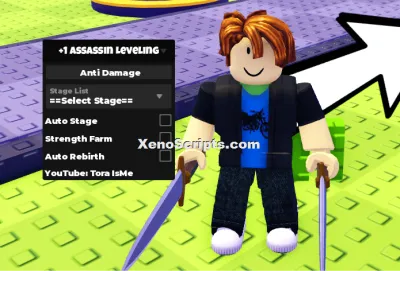
+1 Assassin Leveling

Huss Valley

Cold War
Baddies
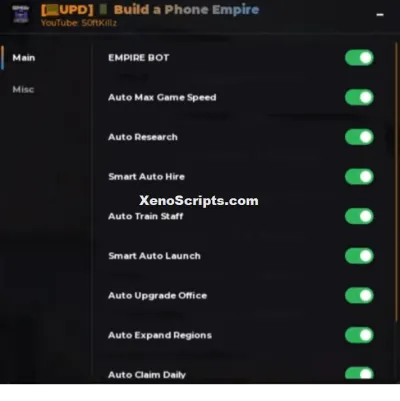
Build a Phone Empire
WRONG WAY
Boosting rockets this script to #1 on the homepage. A free account takes 30 seconds.
Log inGrab boosts and rocket your favorite scripts to the top — plus join the booster wall with the RGB ring.
⚡ Go Pro — 10 boosts/month + zero adsIt jumps to #1 in Recent Scripts and your avatar joins the booster wall.



Comments (0)
Log in to add a comment.