Race Clicker Speed Changer script keyless
1,608 views
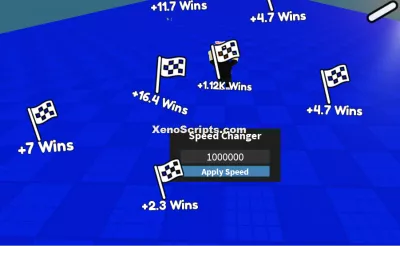
This simple script will help you to change the speed for unlimited wins. but remember when you will be on the track change speed to much higher numbers as in the image. dont change in thousands otherwise you will face lag.


local Players = game:GetService("Players")
local RunService = game:GetService("RunService")
local player = Players.LocalPlayer
local character = player.Character or player.CharacterAdded:Wait()
local hrp = character:WaitForChild("HumanoidRootPart")

-- GUI Setup
local gui = Instance.new("ScreenGui", player:WaitForChild("PlayerGui"))
gui.Name = "SpeedChangerGUI"

local frame = Instance.new("Frame", gui)
frame.Size = UDim2.new(0, 250, 0, 120)
frame.Position = UDim2.new(0.5, -125, 0.6, 0)
frame.BackgroundColor3 = Color3.fromRGB(30, 30, 30)
frame.BorderSizePixel = 0
frame.Active = true
frame.Draggable = false -- We'll implement custom dragging

local title = Instance.new("TextLabel", frame)
title.Size = UDim2.new(1, 0, 0, 30)
title.Text = "Speed Changer"
title.TextColor3 = Color3.new(1,1,1)
title.BackgroundTransparency = 1
title.Font = Enum.Font.SourceSansBold
title.TextScaled = true

local textbox = Instance.new("TextBox", frame)
textbox.Position = UDim2.new(0.1, 0, 0.4, 0)
textbox.Size = UDim2.new(0.8, 0, 0.25, 0)
textbox.PlaceholderText = "Enter speed"
textbox.Text = ""
textbox.BackgroundColor3 = Color3.fromRGB(50, 50, 50)
textbox.TextColor3 = Color3.new(1,1,1)
textbox.Font = Enum.Font.SourceSans
textbox.TextScaled = true

local applyButton = Instance.new("TextButton", frame)
applyButton.Position = UDim2.new(0.1, 0, 0.7, 0)
applyButton.Size = UDim2.new(0.8, 0, 0.2, 0)
applyButton.Text = "Apply Speed"
applyButton.BackgroundColor3 = Color3.fromRGB(70, 130, 180)
applyButton.TextColor3 = Color3.new(1,1,1)
applyButton.Font = Enum.Font.SourceSansBold
applyButton.TextScaled = true

local currentSpeed = 0

applyButton.MouseButton1Click:Connect(function()
	local newSpeed = tonumber(textbox.Text)
	if newSpeed then
		currentSpeed = newSpeed
	end
end)

RunService.RenderStepped:Connect(function()
	if character and hrp then
		hrp.Velocity = hrp.CFrame.LookVector * currentSpeed
	end
end)

-- Dragging functionality
local dragging
local dragInput
local dragStart
local startPos

local function update(input)
	local delta = input.Position - dragStart
	frame.Position = UDim2.new(
		startPos.X.Scale,
		startPos.X.Offset + delta.X,
		startPos.Y.Scale,
		startPos.Y.Offset + delta.Y
	)
end

frame.InputBegan:Connect(function(input)
	if input.UserInputType == Enum.UserInputType.MouseButton1 or input.UserInputType == Enum.UserInputType.Touch then
		dragging = true
		dragStart = input.Position
		startPos = frame.Position

		input.Changed:Connect(function()
			if input.UserInputState == Enum.UserInputState.End then
				dragging = false
			end
		end)
	end
end)

frame.InputChanged:Connect(function(input)
	if input.UserInputType == Enum.UserInputType.MouseMovement or input.UserInputType == Enum.UserInputType.Touch then
		dragInput = input
	end
end)

game:GetService("UserInputService").InputChanged:Connect(function(input)
	if dragging and input == dragInput then
		update(input)
	end
end)
+1 Assassin Leveling

Huss Valley

Cold War
Baddies
Build a Phone Empire
WRONG WAY
Boosting rockets this script to #1 on the homepage. A free account takes 30 seconds.
Log inGrab boosts and rocket your favorite scripts to the top — plus join the booster wall with the RGB ring.
⚡ Go Pro — 10 boosts/month + zero adsIt jumps to #1 in Recent Scripts and your avatar joins the booster wall.

Comments (0)
Log in to add a comment.