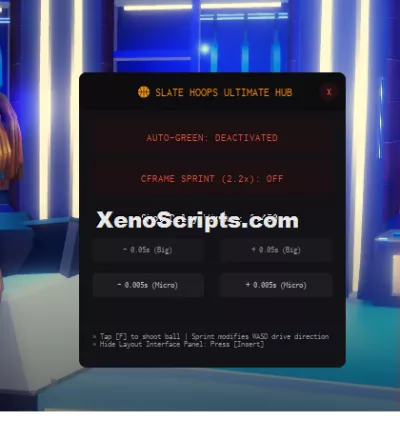
Slat Hoops Ultimate Hub
2,544 views
this is a Universal basketball auto green script and you can turn on the auto green and c frame sprint. you will also see the shot delay window with customizations.


-- Universal Basketball Auto-Green & CFrame Speed Hub
local Players = game:GetService("Players")
local UserInputService = game:GetService("UserInputService")
local RunService = game:GetService("RunService")
local VirtualInputManager = game:GetService("VirtualInputManager")
local Player = Players.LocalPlayer

-- 1. Create a Clean, Tuff Cyber Slate GUI Layer
local ScreenGui = Instance.new("ScreenGui")
ScreenGui.Name = "SlateHoopsUltimateHub"
ScreenGui.ResetOnSpawn = false
ScreenGui.Parent = Player:WaitForChild("PlayerGui")

-- Main Menu Window Layout (Height increased to fit the speed toggle)
local MainFrame = Instance.new("Frame", ScreenGui)
MainFrame.Name = "MainFrame"
MainFrame.Size = UDim2.new(0, 280, 0, 310)
MainFrame.Position = UDim2.new(0.5, -140, 0.5, -155)
MainFrame.BackgroundColor3 = Color3.fromRGB(18, 18, 22) -- Matte charcoal obsidian
MainFrame.BorderSizePixel = 0
MainFrame.Active = true
MainFrame.Draggable = true

local FrameCorner = Instance.new("UICorner", MainFrame)
FrameCorner.CornerRadius = UDim.new(0, 8)

local Title = Instance.new("TextLabel", MainFrame)
Title.Size = UDim2.new(1, 0, 0, 40)
Title.BackgroundColor3 = Color3.fromRGB(12, 12, 14)
Title.Text = " 🏀 SLATE HOOPS ULTIMATE HUB"
Title.TextColor3 = Color3.fromRGB(255, 140, 0) -- Basketball neon orange tint
Title.TextSize = 12
Title.Font = Enum.Font.Code
Title.TextXAlignment = Enum.TextXAlignment.Center

local TitleCorner = Instance.new("UICorner", Title)
TitleCorner.CornerRadius = UDim.new(0, 8)

-- Auto-Green Master Toggle Switch Button
local ToggleBtn = Instance.new("TextButton", MainFrame)
ToggleBtn.Size = UDim2.new(0.9, 0, 0, 35)
ToggleBtn.Position = UDim2.new(0.05, 0, 0.16, 0)
ToggleBtn.BackgroundColor3 = Color3.fromRGB(28, 16, 18) -- Dark red warning base
ToggleBtn.Text = "AUTO-GREEN: DEACTIVATED"
ToggleBtn.TextColor3 = Color3.fromRGB(231, 76, 60)
ToggleBtn.TextSize = 11
ToggleBtn.Font = Enum.Font.Code
Instance.new("UICorner", ToggleBtn).CornerRadius = UDim.new(0, 6)

-- NEW: CFrame Speed Boost Master Toggle Button
local SpeedBtn = Instance.new("TextButton", MainFrame)
SpeedBtn.Size = UDim2.new(0.9, 0, 0, 35)
SpeedBtn.Position = UDim2.new(0.05, 0, 0.30, 0)
SpeedBtn.BackgroundColor3 = Color3.fromRGB(28, 16, 18)
SpeedBtn.Text = "CFRAME SPRINT (2.2x): OFF"
SpeedBtn.TextColor3 = Color3.fromRGB(231, 76, 60)
SpeedBtn.TextSize = 11
SpeedBtn.Font = Enum.Font.Code
Instance.new("UICorner", SpeedBtn).CornerRadius = UDim.new(0, 6)

-- Timing Configuration Label Monitor
local DelayMonitorLabel = Instance.new("TextLabel", MainFrame)
DelayMonitorLabel.Size = UDim2.new(0.9, 0, 0, 25)
DelayMonitorLabel.Position = UDim2.new(0.05, 0, 0.45, 0)
DelayMonitorLabel.BackgroundTransparency = 1
DelayMonitorLabel.Text = "Shot Delay Window: 0.450s"
DelayMonitorLabel.TextColor3 = Color3.fromRGB(255, 255, 255)
DelayMonitorLabel.TextSize = 12
DelayMonitorLabel.Font = Enum.Font.Code

-- 50ms Big Adjuster Buttons
local BigMinusBtn = Instance.new("TextButton", MainFrame)
BigMinusBtn.Size = UDim2.new(0.42, 0, 0, 25)
BigMinusBtn.Position = UDim2.new(0.05, 0, 0.56, 0)
BigMinusBtn.BackgroundColor3 = Color3.fromRGB(25, 25, 30)
BigMinusBtn.Text = "- 0.05s (Big)"
BigMinusBtn.TextColor3 = Color3.fromRGB(150, 150, 150)
BigMinusBtn.Font = Enum.Font.Code
Instance.new("UICorner", BigMinusBtn).CornerRadius = UDim.new(0, 4)

local BigPlusBtn = Instance.new("TextButton", MainFrame)
BigPlusBtn.Size = UDim2.new(0.42, 0, 0, 25)
BigPlusBtn.Position = UDim2.new(0.53, 0, 0.56, 0)
BigPlusBtn.BackgroundColor3 = Color3.fromRGB(25, 25, 30)
BigPlusBtn.Text = "+ 0.05s (Big)"
BigPlusBtn.TextColor3 = Color3.fromRGB(150, 150, 150)
BigPlusBtn.Font = Enum.Font.Code
Instance.new("UICorner", BigPlusBtn).CornerRadius = UDim.new(0, 4)

-- 5ms Micro-Tune Adjuster Buttons
local MicroMinusBtn = Instance.new("TextButton", MainFrame)
MicroMinusBtn.Size = UDim2.new(0.42, 0, 0, 25)
MicroMinusBtn.Position = UDim2.new(0.05, 0, 0.68, 0)
MicroMinusBtn.BackgroundColor3 = Color3.fromRGB(30, 30, 35)
MicroMinusBtn.Text = "- 0.005s (Micro)"
MicroMinusBtn.TextColor3 = Color3.fromRGB(200, 200, 200)
MicroMinusBtn.Font = Enum.Font.Code
Instance.new("UICorner", MicroMinusBtn).CornerRadius = UDim.new(0, 4)

local MicroPlusBtn = Instance.new("TextButton", MainFrame)
MicroPlusBtn.Size = UDim2.new(0.42, 0, 0, 25)
MicroPlusBtn.Position = UDim2.new(0.53, 0, 0.68, 0)
MicroPlusBtn.BackgroundColor3 = Color3.fromRGB(30, 30, 35)
MicroPlusBtn.Text = "+ 0.005s (Micro)"
MicroPlusBtn.TextColor3 = Color3.fromRGB(200, 200, 200)
MicroPlusBtn.Font = Enum.Font.Code
Instance.new("UICorner", MicroPlusBtn).CornerRadius = UDim.new(0, 4)

-- Information Utility Controls Details Layout Label
local InfoLabel = Instance.new("TextLabel", MainFrame)
InfoLabel.Size = UDim2.new(0.9, 0, 0, 35)
InfoLabel.Position = UDim2.new(0.05, 0, 0.85, 0)
InfoLabel.BackgroundTransparency = 1
InfoLabel.Text = "» Tap [F] to shoot ball | Sprint modifies WASD drive direction\n» Hide Layout Interface Panel: Press [Insert]"
InfoLabel.TextColor3 = Color3.fromRGB(140, 145, 150)
InfoLabel.TextSize = 8.5
InfoLabel.Font = Enum.Font.Code
InfoLabel.TextXAlignment = Enum.TextXAlignment.Left

-- Compact Close Icon Button
local CloseBtn = Instance.new("TextButton", MainFrame)
CloseBtn.Size = UDim2.new(0, 20, 0, 20)
CloseBtn.Position = UDim2.new(1, -28, 0, 10)
CloseBtn.BackgroundColor3 = Color3.fromRGB(35, 15, 15)
CloseBtn.Text = "X"
CloseBtn.TextColor3 = Color3.fromRGB(255, 100, 100)
CloseBtn.TextSize = 9
CloseBtn.Font = Enum.Font.Code
Instance.new("UICorner", CloseBtn).CornerRadius = UDim.new(1, 0)

CloseBtn.MouseButton1Click:Connect(function() ScreenGui:Destroy() end)

-- 2. State & Timing Configuration Variables
local AutoGreenActive = false
local CFrameSpeedActive = false
local AutoReleaseDelay = 0.450
local ShotIsExecuting = false
local SprintMultiplier = 2.2 -- Locked to a stable, un-clamped speed boost value

local function updateUIGraphics(state)
	if state then
		ToggleBtn.BackgroundColor3 = Color3.fromRGB(16, 32, 22)
		ToggleBtn.TextColor3 = Color3.fromRGB(0, 255, 150)
		ToggleBtn.Text = "⚡ AUTO-GREEN ENGINE: ACTIVE"
	else
		ToggleBtn.BackgroundColor3 = Color3.fromRGB(28, 16, 18)
		ToggleBtn.TextColor3 = Color3.fromRGB(231, 76, 60)
		ToggleBtn.Text = "AUTO-GREEN: DEACTIVATED"
	end
end

local function updateSpeedGraphics(state)
	if state then
		SpeedBtn.BackgroundColor3 = Color3.fromRGB(16, 32, 22)
		SpeedBtn.TextColor3 = Color3.fromRGB(0, 255, 150)
		SpeedBtn.Text = "⚡ CFRAME SPRINT (2.2x): ACTIVE"
	else
		SpeedBtn.BackgroundColor3 = Color3.fromRGB(28, 16, 18)
		SpeedBtn.TextColor3 = Color3.fromRGB(231, 76, 60)
		SpeedBtn.Text = "CFRAME SPRINT (2.5x): OFF"
	end
end

-- Absolute Mouse Pixel Calculations
UserInputService.InputBegan:Connect(function(input, processed)
	if input.UserInputType == Enum.UserInputType.MouseButton1 then
		local mPos = UserInputService:GetMouseLocation()

		local function checkClick(btn)
			local bPos = btn.AbsolutePosition
			local bSize = btn.AbsoluteSize
			return mPos.X >= bPos.X and mPos.X <= (bPos.X + bSize.X) and mPos.Y >= bPos.Y and mPos.Y <= (bPos.Y + bSize.Y)
		end

		if checkClick(ToggleBtn) then
			AutoGreenActive = not AutoGreenActive
			updateUIGraphics(AutoGreenActive)
			return
		elseif checkClick(SpeedBtn) then
			CFrameSpeedActive = not CFrameSpeedActive
			updateSpeedGraphics(CFrameSpeedActive)
			return
		elseif checkClick(BigMinusBtn) then
			AutoReleaseDelay = math.clamp(AutoReleaseDelay - 0.05, 0.01, 2.0)
		elseif checkClick(BigPlusBtn) then
			AutoReleaseDelay = math.clamp(AutoReleaseDelay + 0.05, 0.01, 2.0)
		elseif checkClick(MicroMinusBtn) then
			AutoReleaseDelay = math.clamp(AutoReleaseDelay - 0.005, 0.01, 2.0)
		elseif checkClick(MicroPlusBtn) then
			AutoReleaseDelay = math.clamp(AutoReleaseDelay + 0.005, 0.01, 2.0)
		end
		DelayMonitorLabel.Text = string.format("Shot Delay Window: %.3fs", AutoReleaseDelay)
	end

	if not processed and input.KeyCode == Enum.KeyCode.Insert then
		MainFrame.Visible = not MainFrame.Visible
	end
end)

-- Dedicated Macro Execution Loop Engine
local function executePerfectHoldMacro()
	if ShotIsExecuting then return end
	ShotIsExecuting = true

	pcall(function()
		VirtualInputManager:SendKeyEvent(true, Enum.KeyCode.E, false, game)
	end)

	task.wait(AutoReleaseDelay)

	pcall(function()
		VirtualInputManager:SendKeyEvent(false, Enum.KeyCode.E, false, game)
	end)

	ShotIsExecuting = false
end

-- Intercept Keypress Events
UserInputService.InputBegan:Connect(function(input, processed)
	if processed or not AutoGreenActive or ShotIsExecuting then return end
	if input.KeyCode == Enum.KeyCode.F then
		if Player.Character and Player.Character:FindFirstChild("HumanoidRootPart") then
			task.spawn(executePerfectHoldMacro)
		end
	end
end)

-- 3. High-Priority CFrame Speed Loop (Bypasses Anti-Cheat Walkspeed Clamps)
RunService.PostSimulation:Connect(function()
	if not CFrameSpeedActive then return end

	local myChar = Player.Character
	if not myChar or not myChar:FindFirstChild("HumanoidRootPart") or not myChar:FindFirstChild("Humanoid") then return end
	local hrp = myChar.HumanoidRootPart
	local humanoid = myChar.Humanoid

	-- Only inject movement vectors if the user is actively pressing WASD/movement controls
	if humanoid.MoveDirection.Magnitude > 0 then
		-- Frame-by-frame offset shift pushes you forward invisibly
		hrp.CFrame = hrp.CFrame + (humanoid.MoveDirection * (SprintMultiplier / 10))
	end
end)
Basketball Legends🏀

Basketball Legends
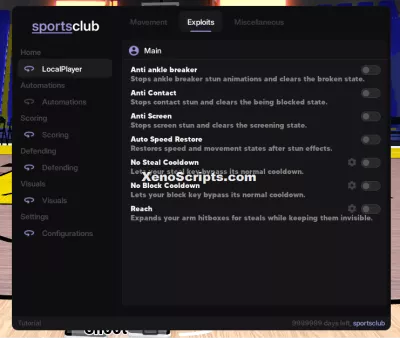
🏀 Basketball Legends

Basketball Legends

Basketball Legend
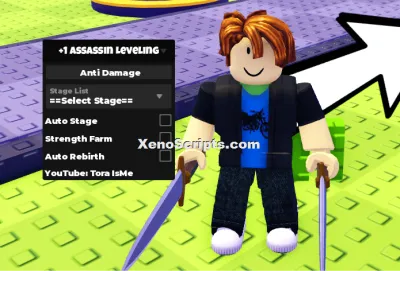
+1 Assassin Leveling
Boosting rockets this script to #1 on the homepage. A free account takes 30 seconds.
Log inGrab boosts and rocket your favorite scripts to the top — plus join the booster wall with the RGB ring.
⚡ Go Pro — 10 boosts/month + zero adsIt jumps to #1 in Recent Scripts and your avatar joins the booster wall.

Comments (0)
Log in to add a comment.