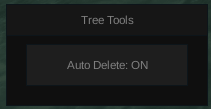
Tree Remover Script for Foresto
2,430 views
on/off switch for deleting trees making you be able too see


local player = game.Players.LocalPlayer

-- GUI
local gui = Instance.new("ScreenGui")
gui.Parent = player:WaitForChild("PlayerGui")

-- Draggable frame
local frame = Instance.new("Frame")
frame.Size = UDim2.new(0,200,0,100)
frame.Position = UDim2.new(0.5,-100,0.7,0)
frame.BackgroundColor3 = Color3.fromRGB(30,30,30)
frame.Active = true
frame.Draggable = true
frame.Parent = gui

-- Title
local title = Instance.new("TextLabel")
title.Size = UDim2.new(1,0,0,30)
title.BackgroundColor3 = Color3.fromRGB(45,45,45)
title.Text = "Tree Tools"
title.TextColor3 = Color3.new(1,1,1)
title.Parent = frame

-- Toggle button
local button = Instance.new("TextButton")
button.Size = UDim2.new(0.8,0,0,40)
button.Position = UDim2.new(0.1,0,0.5,-10)
button.Text = "Auto Delete: OFF"
button.BackgroundColor3 = Color3.fromRGB(60,60,60)
button.TextColor3 = Color3.new(1,1,1)
button.Parent = frame

local enabled = false
local connection

local function deleteTree(tree)
	if tree and tree.Parent then
		tree:Destroy()
	end
end

button.MouseButton1Click:Connect(function()

	local living = workspace:FindFirstChild("Living")
	if not living then return end

	local trees = living:FindFirstChild("Trees")
	if not trees then return end

	enabled = not enabled
	button.Text = enabled and "Auto Delete: ON" or "Auto Delete: OFF"

	if enabled then

		-- delete existing trees
		for _, tree in pairs(trees:GetChildren()) do
			deleteTree(tree)
		end

		-- delete new trees when they spawn
		connection = trees.ChildAdded:Connect(function(tree)
			deleteTree(tree)
		end)

	else

		if connection then
			connection:Disconnect()
			connection = nil
		end

	end

end)
+1 Assassin Leveling

Huss Valley

Cold War

Baddies

Build a Phone Empire

WRONG WAY
Boosting rockets this script to #1 on the homepage. A free account takes 30 seconds.
Log inGrab boosts and rocket your favorite scripts to the top — plus join the booster wall with the RGB ring.
⚡ Go Pro — 10 boosts/month + zero adsIt jumps to #1 in Recent Scripts and your avatar joins the booster wall.

Comments (0)
Log in to add a comment.