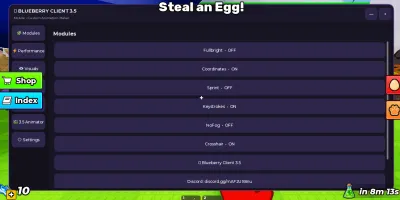
Blueberry Client 3.5 script | Animator, Modules
1,635 views
This Universal script is made by Blueberry client with many cool features such as you can move body parts with the 3.5 animator depending on your configurations. besides this, you will also get game performance enhancement and other modules etc.


local Players = game:GetService("Players")
local UIS = game:GetService("UserInputService")
local TweenService = game:GetService("TweenService")
local RunService = game:GetService("RunService")
local Lighting = game:GetService("Lighting")
local SoundService = game:GetService("SoundService")

local Player = Players.LocalPlayer
local PlayerGui = Player:WaitForChild("PlayerGui")

local Enabled = true
local Playing = false
local AnimationTime = 0
local AnimationLength = 10
local SelectedPart = "Body"
local Keyframes = {}
local UndoStack = {}

local Gui = Instance.new("ScreenGui")
Gui.Name = "BlueberryClient35"
Gui.ResetOnSpawn = false
Gui.IgnoreGuiInset = true
Gui.Parent = PlayerGui

local function Corner(parent, radius)
	local c = Instance.new("UICorner")
	c.CornerRadius = UDim.new(0, radius)
	c.Parent = parent
	return c
end

local function Stroke(parent, color, thickness)
	local s = Instance.new("UIStroke")
	s.Color = color
	s.Thickness = thickness
	s.Transparency = 0.2
	s.Parent = parent
	return s
end

local function Button(parent, text, size, position)
	local b = Instance.new("TextButton")
	b.Size = size
	b.Position = position
	b.BackgroundColor3 = Color3.fromRGB(45, 38, 75)
	b.TextColor3 = Color3.fromRGB(255, 255, 255)
	b.Text = text
	b.Font = Enum.Font.GothamMedium
	b.TextSize = 14
	b.AutoButtonColor = true
	b.Parent = parent
	Corner(b, 10)
	return b
end

local function Label(parent, text, size, position)
	local l = Instance.new("TextLabel")
	l.Size = size
	l.Position = position
	l.BackgroundTransparency = 1
	l.TextColor3 = Color3.fromRGB(235, 235, 245)
	l.Text = text
	l.Font = Enum.Font.GothamMedium
	l.TextSize = 14
	l.TextXAlignment = Enum.TextXAlignment.Left
	l.Parent = parent
	return l
end

local Toggle = Instance.new("TextButton")
Toggle.Name = "BlueberryToggle"
Toggle.Size = UDim2.new(0, 62, 0, 62)
Toggle.Position = UDim2.new(0, 15, 0.5, -31)
Toggle.BackgroundColor3 = Color3.fromRGB(105, 65, 180)
Toggle.Text = "🫐"
Toggle.TextSize = 30
Toggle.Parent = Gui
Corner(Toggle, 31)
Stroke(Toggle, Color3.fromRGB(170, 120, 255), 2)

local Main = Instance.new("Frame")
Main.Name = "Main"
Main.Size = UDim2.new(0.93, 0, 0.78, 0)
Main.Position = UDim2.new(0.035, 0, 0.11, 0)
Main.BackgroundColor3 = Color3.fromRGB(19, 17, 28)
Main.Parent = Gui
Corner(Main, 16)
Stroke(Main, Color3.fromRGB(105, 65, 180), 2)

local Top = Instance.new("Frame")
Top.Size = UDim2.new(1, 0, 0, 58)
Top.BackgroundColor3 = Color3.fromRGB(28, 24, 42)
Top.Parent = Main
Corner(Top, 16)

local Title = Label(Top, "🫐 BLUEBERRY CLIENT 3.5", UDim2.new(1, -110, 0, 28), UDim2.new(0, 15, 0, 5))
Title.Font = Enum.Font.GothamBold
Title.TextSize = 17

local Subtitle = Label(Top, "Mobile • Custom Animation Maker", UDim2.new(1, -110, 0, 20), UDim2.new(0, 15, 0, 30))
Subtitle.TextColor3 = Color3.fromRGB(160, 150, 185)
Subtitle.TextSize = 11

local Minimize = Button(Top, "—", UDim2.new(0, 38, 0, 38), UDim2.new(1, -88, 0, 10))
local Close = Button(Top, "×", UDim2.new(0, 38, 0, 38), UDim2.new(1, -45, 0, 10))

local Sidebar = Instance.new("ScrollingFrame")
Sidebar.Size = UDim2.new(0, 112, 1, -68)
Sidebar.Position = UDim2.new(0, 8, 0, 64)
Sidebar.BackgroundTransparency = 1
Sidebar.BorderSizePixel = 0
Sidebar.ScrollBarThickness = 3
Sidebar.CanvasSize = UDim2.new(0, 0, 0, 420)
Sidebar.Parent = Main

local SideLayout = Instance.new("UIListLayout")
SideLayout.Padding = UDim.new(0, 7)
SideLayout.Parent = Sidebar

local Content = Instance.new("Frame")
Content.Size = UDim2.new(1, -130, 1, -68)
Content.Position = UDim2.new(0, 122, 0, 64)
Content.BackgroundColor3 = Color3.fromRGB(24, 21, 35)
Content.Parent = Main
Corner(Content, 12)

local PageTitle = Label(Content, "Modules", UDim2.new(1, -30, 0, 35), UDim2.new(0, 15, 0, 8))
PageTitle.Font = Enum.Font.GothamBold
PageTitle.TextSize = 18

local PageScroll = Instance.new("ScrollingFrame")
PageScroll.Name = "PageScroll"
PageScroll.Size = UDim2.new(1, -16, 1, -52)
PageScroll.Position = UDim2.new(0, 8, 0, 48)
PageScroll.BackgroundTransparency = 1
PageScroll.BorderSizePixel = 0
PageScroll.ScrollBarThickness = 5
PageScroll.ScrollBarImageTransparency = 0.15
PageScroll.CanvasSize = UDim2.new(0, 0, 0, 0)
PageScroll.AutomaticCanvasSize = Enum.AutomaticSize.Y
PageScroll.ScrollingDirection = Enum.ScrollingDirection.Y
PageScroll.Parent = Content

local PageLayout = Instance.new("UIListLayout")
PageLayout.Padding = UDim.new(0, 10)
PageLayout.HorizontalAlignment = Enum.HorizontalAlignment.Center
PageLayout.Parent = PageScroll

local PagePadding = Instance.new("UIPadding")
PagePadding.PaddingTop = UDim.new(0, 5)
PagePadding.PaddingBottom = UDim.new(0, 20)
PagePadding.PaddingLeft = UDim.new(0, 5)
PagePadding.PaddingRight = UDim.new(0, 5)
PagePadding.Parent = PageScroll

local function ClearPage()
	for _, child in ipairs(PageScroll:GetChildren()) do
		if not child:IsA("UIListLayout") and not child:IsA("UIPadding") then
			child:Destroy()
		end
	end
	PageScroll.CanvasPosition = Vector2.new(0, 0)
end

local function Notify(text)
	local Note = Instance.new("TextLabel")
	Note.Size = UDim2.new(0, 230, 0, 42)
	Note.Position = UDim2.new(0.5, -115, 1, -60)
	Note.BackgroundColor3 = Color3.fromRGB(45, 35, 70)
	Note.TextColor3 = Color3.new(1, 1, 1)
	Note.Text = text
	Note.Font = Enum.Font.GothamMedium
	Note.TextSize = 13
	Note.Parent = Gui
	Corner(Note, 12)
	Stroke(Note, Color3.fromRGB(130, 85, 220), 1)

	TweenService:Create(Note, TweenInfo.new(0.2), {
		Position = UDim2.new(0.5, -115, 1, -110)
	}):Play()

	task.delay(2, function()
		if Note then
			TweenService:Create(Note, TweenInfo.new(0.2), {
				Position = UDim2.new(0.5, -115, 1, -60),
				TextTransparency = 1,
				BackgroundTransparency = 1
			}):Play()

			task.wait(0.25)
			Note:Destroy()
		end
	end)
end

local function AddCard(text, callback)
	local b = Button(PageScroll, text, UDim2.new(1, -10, 0, 48), UDim2.new())
	b.MouseButton1Click:Connect(callback)
	return b
end

local function AddSection(text)
	local section = Label(PageScroll, text, UDim2.new(1, -10, 0, 30), UDim2.new())
	section.Font = Enum.Font.GothamBold
	section.TextColor3 = Color3.fromRGB(170, 130, 255)
	section.TextSize = 15
	return section
end

local Modules = {
	Fullbright = false,
	NoFog = false,
	Crosshair = false,
	Keystrokes = false,
	Coordinates = false,
	Sprint = false
}

local function ToggleModule(name)
	Modules[name] = not Modules[name]

	if name == "Fullbright" then
		if Modules[name] then
			Lighting.Brightness = 3
			Lighting.ClockTime = 14
			Lighting.FogEnd = 100000
		else
			Lighting.Brightness = 2
			Lighting.ClockTime = 14
		end
	elseif name == "NoFog" then
		if Modules[name] then
			Lighting.FogEnd = 100000
		else
			Lighting.FogEnd = 1000
		end
	elseif name == "Crosshair" then
		local existing = Gui:FindFirstChild("BlueberryCrosshair")

		if Modules[name] and not existing then
			local Cross = Instance.new("TextLabel")
			Cross.Name = "BlueberryCrosshair"
			Cross.Size = UDim2.new(0, 40, 0, 40)
			Cross.Position = UDim2.new(0.5, -20, 0.5, -20)
			Cross.BackgroundTransparency = 1
			Cross.Text = "+"
			Cross.TextColor3 = Color3.new(1, 1, 1)
			Cross.TextSize = 25
			Cross.Font = Enum.Font.GothamBold
			Cross.Parent = Gui
		elseif not Modules[name] and existing then
			existing:Destroy()
		end
	end

	Notify(name .. (Modules[name] and " ON" or " OFF"))
end

local function ShowModules()
	ClearPage()
	PageTitle.Text = "Modules"

	AddSection("VISUAL MODULES")

	for name in pairs(Modules) do
		local current = name
		AddCard(current .. "  •  " .. (Modules[current] and "ON" or "OFF"), function()
			ToggleModule(current)
			ShowModules()
		end)
	end

	AddSection("QUICK INFO")

	AddCard("🫐 Blueberry Client 3.5", function()
		Notify("Mobile Edition")
	end)

	AddCard("Discord: discord.gg/mAF2UX8nu", function()
		Notify("Blueberry Client Discord")
	end)
end

local function ShowPerformance()
	ClearPage()
	PageTitle.Text = "Performance"

	local FPSLabel = AddCard("FPS: calculating...", function() end)
	local PingLabel = AddCard("Ping: checking...", function() end)
	local InfoLabel = AddCard("Performance information", function()
		Notify("Safe visual performance tools")
	end)

	local Connection

	Connection = RunService.RenderStepped:Connect(function()
		if not PageScroll.Parent then
			Connection:Disconnect()
			return
		end

		local fps = math.floor(1 / math.max(RunService.RenderStepped:Wait(), 0.001))
		FPSLabel.Text = "FPS: " .. tostring(fps)

		local ping = math.floor(Player:GetNetworkPing() * 1000)
		PingLabel.Text = "Ping: " .. tostring(ping) .. " ms"
	end)
end

local function ShowVisuals()
	ClearPage()
	PageTitle.Text = "Visuals"

	AddSection("VISUAL SETTINGS")

	AddCard("Fullbright", function()
		ToggleModule("Fullbright")
	end)

	AddCard("No Fog", function()
		ToggleModule("NoFog")
	end)

	AddCard("Crosshair", function()
		ToggleModule("Crosshair")
	end)

	AddCard("UI Scale", function()
		Notify("Mobile UI scaling")
	end)

	AddCard("FOV", function()
		Notify("FOV controls coming soon")
	end)
end

local function ShowControls()
	ClearPage()
	PageTitle.Text = "Controls"

	AddSection("TOUCH CONTROLS")

	AddCard("Touch & Drag UI", function()
		Notify("Touch dragging enabled")
	end)

	AddCard("Sprint Toggle", function()
		ToggleModule("Sprint")
	end)

	AddCard("Mobile Controls", function()
		Notify("Designed for touch screens")
	end)
end

local MusicSound

local function ShowMusic()
	ClearPage()
	PageTitle.Text = "Music"

	AddSection("ROBLOX AUDIO")

	local IDBox = Instance.new("TextBox")
	IDBox.Size = UDim2.new(1, -10, 0, 48)
	IDBox.BackgroundColor3 = Color3.fromRGB(35, 30, 50)
	IDBox.PlaceholderText = "Enter Roblox Audio ID"
	IDBox.Text = ""
	IDBox.TextColor3 = Color3.new(1, 1, 1)
	IDBox.PlaceholderColor3 = Color3.fromRGB(150, 145, 165)
	IDBox.Font = Enum.Font.GothamMedium
	IDBox.TextSize = 14
	IDBox.ClearTextOnFocus = false
	IDBox.Parent = PageScroll
	Corner(IDBox, 10)

	AddCard("▶ Play", function()
		local id = tonumber(IDBox.Text)

		if not id then
			Notify("Enter a valid audio ID")
			return
		end

		if MusicSound then
			MusicSound:Destroy()
		end

		MusicSound = Instance.new("Sound")
		MusicSound.Name = "BlueberryMusic"
		MusicSound.SoundId = "rbxassetid://" .. id
		MusicSound.Volume = 0.5
		MusicSound.Looped = true
		MusicSound.Parent = SoundService
		MusicSound:Play()

		Notify("Music started")
	end)

	AddCard("⏸ Pause", function()
		if MusicSound then
			MusicSound:Pause()
		end
	end)

	AddCard("⏹ Stop", function()
		if MusicSound then
			MusicSound:Stop()
		end
	end)

	AddCard("🔁 Loop: ON", function()
		if MusicSound then
			MusicSound.Looped = not MusicSound.Looped
			Notify("Loop " .. (MusicSound.Looped and "ON" or "OFF"))
		else
			Notify("Play music first")
		end
	end)
end

local PartList = {
	"Body",
	"Head",
	"LeftArm",
	"RightArm",
	"LeftLeg",
	"RightLeg"
}

local function AddKeyframe(time, part)
	if not Keyframes[time] then
		Keyframes[time] = {}
	end

	Keyframes[time][part] = {
		Position = Vector3.zero,
		Rotation = Vector3.zero
	}

	table.insert(UndoStack, {
		Time = time,
		Part = part
	})
end

local function CountKeyframes()
	local count = 0

	for _, parts in pairs(Keyframes) do
		for _ in pairs(parts) do
			count += 1
		end
	end

	return count
end

local function ShowAnimationMaker()
	ClearPage()
	PageTitle.Text = "3.5 • Animation Maker"

	AddSection("ANIMATION SETUP")

	local Info = Label(PageScroll, "Create keyframes for your custom animation.", UDim2.new(1, -10, 0, 38), UDim2.new())
	Info.TextWrapped = true
	Info.TextColor3 = Color3.fromRGB(180, 175, 195)

	local TimeBox = Instance.new("TextBox")
	TimeBox.Size = UDim2.new(1, -10, 0, 48)
	TimeBox.BackgroundColor3 = Color3.fromRGB(35, 30, 50)
	TimeBox.TextColor3 = Color3.new(1, 1, 1)
	TimeBox.PlaceholderText = "Keyframe time: 0 - 10"
	TimeBox.PlaceholderColor3 = Color3.fromRGB(145, 140, 165)
	TimeBox.Text = tostring(AnimationTime)
	TimeBox.Font = Enum.Font.GothamMedium
	TimeBox.TextSize = 14
	TimeBox.ClearTextOnFocus = false
	TimeBox.Parent = PageScroll
	Corner(TimeBox, 10)

	AddCard("Part: " .. SelectedPart, function()
		local index = table.find(PartList, SelectedPart) or 1
		index += 1

		if index > #PartList then
			index = 1
		end

		SelectedPart = PartList[index]
		ShowAnimationMaker()
	end)

	AddCard("➕ Add Keyframe", function()
		local time = tonumber(TimeBox.Text)

		if not time then
			Notify("Enter a number from 0 to 10")
			return
		end

		time = math.clamp(time, 0, AnimationLength)
		AnimationTime = time

		AddKeyframe(time, SelectedPart)

		Notify("Keyframe added at " .. tostring(time) .. "s")
		ShowAnimationMaker()
	end)

	AddSection("TIMELINE")

	local Timeline = Instance.new("Frame")
	Timeline.Size = UDim2.new(1, -10, 0, 75)
	Timeline.BackgroundColor3 = Color3.fromRGB(30, 26, 42)
	Timeline.Parent = PageScroll
	Corner(Timeline, 10)

	for i = 0, 10 do
		local Marker = Instance.new("TextLabel")
		Marker.Size = UDim2.new(0, 35, 0, 25)
		Marker.Position = UDim2.new(i / 10, -17, 0, 8)
		Marker.BackgroundTransparency = 1
		Marker.Text = tostring(i)
		Marker.TextColor3 = Color3.fromRGB(200, 195, 215)
		Marker.Font = Enum.Font.GothamMedium
		Marker.TextSize = 11
		Marker.Parent = Timeline

		local Line = Instance.new("Frame")
		Line.Size = UDim2.new(0, 1, 0, 30)
		Line.Position = UDim2.new(i / 10, 0, 0, 35)
		Line.BackgroundColor3 = Color3.fromRGB(100, 90, 125)
		Line.BorderSizePixel = 0
		Line.Parent = Timeline
	end

	local KeyInfo = Label(
		PageScroll,
		"Keyframes: " .. tostring(CountKeyframes()),
		UDim2.new(1, -10, 0, 35),
		UDim2.new()
	)

	KeyInfo.TextColor3 = Color3.fromRGB(170, 150, 230)

	AddSection("PLAYBACK")

	AddCard(Playing and "⏸ Pause Animation" or "▶ Play Animation", function()
		Playing = not Playing
		Notify(Playing and "Animation playing" or "Animation paused")
		ShowAnimationMaker()
	end)

	AddCard("⏹ Stop & Reset", function()
		Playing = false
		AnimationTime = 0
		Notify("Animation stopped")
		ShowAnimationMaker()
	end)

	AddCard("🔄 Clear Keyframes", function()
		Keyframes = {}
		UndoStack = {}
		AnimationTime = 0
		Notify("Keyframes cleared")
		ShowAnimationMaker()
	end)

	AddSection("KEYFRAME DATA")

	for time, parts in pairs(Keyframes) do
		for part in pairs(parts) do
			AddCard("⏱ " .. tostring(time) .. "s  •  " .. part, function()
				Keyframes[time][part] = nil

				if next(Keyframes[time]) == nil then
					Keyframes[time] = nil
				end

				Notify("Keyframe removed")
				ShowAnimationMaker()
			end)
		end
	end

	AddSection("SAVE / UNDO")

	AddCard("💾 Save Animation", function()
		Notify("Animation data prepared")
	end)

	AddCard("↩ Undo Last Keyframe", function()
		local last = table.remove(UndoStack)

		if not last then
			Notify("Nothing to undo")
			return
		end

		if Keyframes[last.Time] then
			Keyframes[last.Time][last.Part] = nil

			if next(Keyframes[last.Time]) == nil then
				Keyframes[last.Time] = nil
			end
		end

		Notify("Last keyframe undone")
		ShowAnimationMaker()
	end)

	AddCard("📥 Load Animation", function()
		Notify("Animation loader ready")
	end)

	AddSection("3.5 INFO")

	local Info2 = Label(
		PageScroll,
		"Swipe up and down to access every Animation Maker control. The editor is designed for mobile screens.",
		UDim2.new(1, -10, 0, 60),
		UDim2.new()
	)

	Info2.TextWrapped = true
	Info2.TextColor3 = Color3.fromRGB(170, 165, 185)
end

local function ShowSettings()
	ClearPage()
	PageTitle.Text = "Settings"

	AddSection("CLIENT")

	AddCard("🫐 Blueberry Client 3.5", function()
		Notify("Current version: 3.5")
	end)

	AddCard("Reset Modules", function()
		for name in pairs(Modules) do
			Modules[name] = false
		end

		Notify("Modules reset")
		ShowSettings()
	end)

	AddCard("Reset Animation", function()
		Keyframes = {}
		UndoStack = {}
		AnimationTime = 0
		Notify("Animation reset")
	end)

	AddSection("ABOUT")

	AddCard("Mobile Edition", function()
		Notify("Touch-only interface")
	end)

	AddCard("Discord: discord.gg/mAF2UX8nu", function()
		Notify("Blueberry Client Discord")
	end)
end

local Tabs = {
	{"🧩 Modules", ShowModules},
	{"⚡ Performance", ShowPerformance},
	{"👁️ Visuals", ShowVisuals},
	{"🎮 Controls", ShowControls},
	{"🎵 Music", ShowMusic},
	{"🎬 3.5 Animator", ShowAnimationMaker},
	{"⚙️ Settings", ShowSettings}
}

for _, tab in ipairs(Tabs) do
	local b = Button(Sidebar, tab[1], UDim2.new(1, -8, 0, 48), UDim2.new())
	b.MouseButton1Click:Connect(tab[2])
end

local Dragging = false
local DragStart
local StartPosition

Top.InputBegan:Connect(function(input)
	if input.UserInputType == Enum.UserInputType.Touch then
		Dragging = true
		DragStart = input.Position
		StartPosition = Main.Position
	end
end)

Top.InputChanged:Connect(function(input)
	if input.UserInputType == Enum.UserInputType.Touch then
		DragStart = DragStart
	end
end)

UIS.InputChanged:Connect(function(input)
	if Dragging and input.UserInputType == Enum.UserInputType.Touch then
		local Delta = input.Position - DragStart

		Main.Position = UDim2.new(
			StartPosition.X.Scale,
			StartPosition.X.Offset + Delta.X,
			StartPosition.Y.Scale,
			StartPosition.Y.Offset + Delta.Y
		)
	end
end)

UIS.InputEnded:Connect(function(input)
	if input.UserInputType == Enum.UserInputType.Touch then
		Dragging = false
	end
end)

Toggle.MouseButton1Click:Connect(function()
	Enabled = not Enabled
	Main.Visible = Enabled

	TweenService:Create(
		Toggle,
		TweenInfo.new(0.2),
		{
			BackgroundColor3 = Enabled
				and Color3.fromRGB(105, 65, 180)
				or Color3.fromRGB(55, 55, 65)
		}
	):Play()

	Notify(Enabled and "Blueberry Client ON" or "Blueberry Client OFF")
end)

Minimize.MouseButton1Click:Connect(function()
	Main.Visible = false
end)

Close.MouseButton1Click:Connect(function()
	Main.Visible = false
	Enabled = false
end)

RunService.Heartbeat:Connect(function(deltaTime)
	if Playing then
		AnimationTime += deltaTime

		if AnimationTime >= AnimationLength then
			AnimationTime = 0
		end
	end
end)

ShowModules()
Universal
Universal
Universal

Universal
Universal
Universal
Boosting rockets this script to #1 on the homepage. A free account takes 30 seconds.
Log inGrab boosts and rocket your favorite scripts to the top — plus join the booster wall with the RGB ring.
⚡ Go Pro — 10 boosts/month + zero adsIt jumps to #1 in Recent Scripts and your avatar joins the booster wall.



Comments (0)
Log in to add a comment.