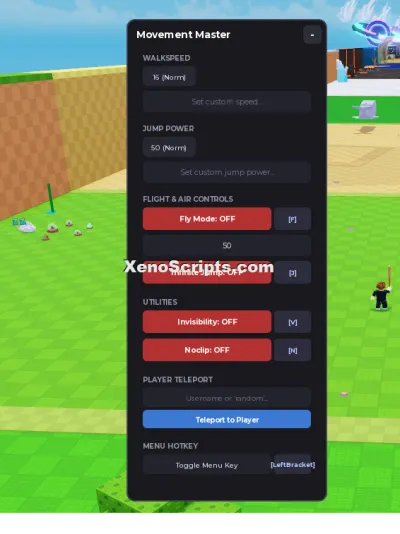
Unified Speed & Jump Controller Menu (Draggable)
1,484 views
This script is made by maxovik777, Press L to open up the menu. you can also use K to open it. you can customize the walk and jump speed easily.


-- Unified Speed & Jump Controller Menu (Draggable)
-- Toggle Key: L or K

local Players = game:GetService("Players")
local UserInputService = game:GetService("UserInputService")

local player = Players.LocalPlayer
local playerGui = player:WaitForChild("PlayerGui")

-- Configuration
local TOGGLE_KEYS = { Enum.KeyCode.L, Enum.KeyCode.K }
local DEFAULT_SPEED = 16
local DEFAULT_JUMP = 50

-- Core GUI Elements
local screenGui = Instance.new("ScreenGui")
screenGui.Name = "MovementMenuGui"
screenGui.ResetOnSpawn = false
screenGui.Parent = playerGui

local mainFrame = Instance.new("Frame")
mainFrame.Name = "MainFrame"
mainFrame.Size = UDim2.new(0, 260, 0, 420)
mainFrame.Position = UDim2.new(0.5, -130, 0.5, -210)
mainFrame.BackgroundColor3 = Color3.fromRGB(25, 25, 30)
mainFrame.BorderSizePixel = 0
mainFrame.Visible = false
mainFrame.Parent = screenGui

local uiCorner = Instance.new("UICorner")
uiCorner.CornerRadius = UDim.new(0, 10)
uiCorner.Parent = mainFrame

local uiStroke = Instance.new("UIStroke")
uiStroke.Color = Color3.fromRGB(60, 60, 80)
uiStroke.Thickness = 1.5
uiStroke.Parent = mainFrame

--------------------------------------------------------------------------------
-- DRAGGABLE IMPLEMENTATION
--------------------------------------------------------------------------------
local dragging = false
local dragInput
local dragStart
local startPos

local function updateInput(input)
	local delta = input.Position - dragStart
	mainFrame.Position = UDim2.new(startPos.X.Scale, startPos.X.Offset + delta.X, startPos.Y.Scale, startPos.Y.Offset + delta.Y)
end

mainFrame.InputBegan:Connect(function(input)
	if input.UserInputType == Enum.UserInputType.MouseButton1 or input.UserInputType == Enum.UserInputType.Touch then
		dragging = true
		dragStart = input.Position
		startPos = mainFrame.Position

		input.Changed:Connect(function()
			if input.UserInputState == Enum.UserInputState.End then
				dragging = false
			end
		end)
	end
end)

mainFrame.InputChanged:Connect(function(input)
	if input.UserInputType == Enum.UserInputType.MouseMovement or input.UserInputType == Enum.UserInputType.Touch then
		dragInput = input
	end
end)

UserInputService.InputChanged:Connect(function(input)
	if input == dragInput and dragging then
		updateInput(input)
	end
end)

--------------------------------------------------------------------------------
-- TITLE HEADER
--------------------------------------------------------------------------------
local titleLabel = Instance.new("TextLabel")
titleLabel.Size = UDim2.new(1, 0, 0, 40)
titleLabel.BackgroundTransparency = 1
titleLabel.Text = "Movement Controls"
titleLabel.TextColor3 = Color3.fromRGB(255, 255, 255)
titleLabel.TextSize = 18
titleLabel.Font = Enum.Font.GothamBold
titleLabel.Parent = mainFrame

--------------------------------------------------------------------------------
-- SECTION 1: SPEED CONTROLLER
--------------------------------------------------------------------------------
local speedHeader = Instance.new("TextLabel")
speedHeader.Size = UDim2.new(0.85, 0, 0, 20)
speedHeader.Position = UDim2.new(0.075, 0, 0, 42)
speedHeader.BackgroundTransparency = 1
speedHeader.Text = "WALKSPEED"
speedHeader.TextColor3 = Color3.fromRGB(150, 150, 170)
speedHeader.TextSize = 11
speedHeader.Font = Enum.Font.GothamBold
speedHeader.TextXAlignment = Enum.TextXAlignment.Left
speedHeader.Parent = mainFrame

local function setSpeed(newSpeed)
	local char = player.Character
	if char then
		local humanoid = char:FindFirstChildOfClass("Humanoid")
		if humanoid then
			humanoid.WalkSpeed = math.clamp(newSpeed, 0, 500)
		end
	end
end

local function createSpeedButton(text, speedValue, posX, posY, sizeX)
	local btn = Instance.new("TextButton")
	btn.Size = UDim2.new(0, sizeX, 0, 30)
	btn.Position = UDim2.new(0.075 + posX, 0, 0, posY)
	btn.BackgroundColor3 = Color3.fromRGB(40, 40, 50)
	btn.Text = text
	btn.TextColor3 = Color3.fromRGB(220, 220, 240)
	btn.TextSize = 12
	btn.Font = Enum.Font.GothamMedium
	btn.BorderSizePixel = 0
	btn.Parent = mainFrame

	local btnCorner = Instance.new("UICorner")
	btnCorner.CornerRadius = UDim.new(0, 6)
	btnCorner.Parent = btn

	btn.MouseButton1Click:Connect(function()
		setSpeed(speedValue)
	end)
end

-- Speed Preset Buttons (3-column layout)
createSpeedButton("Normal (16)", 16, 0, 65, 70)
createSpeedButton("Fast (50)", 50, 75, 65, 70)
createSpeedButton("Super (100)", 100, 150, 65, 70)

-- Custom Speed Input
local speedInput = Instance.new("TextBox")
speedInput.Size = UDim2.new(0.85, 0, 0, 32)
speedInput.Position = UDim2.new(0.075, 0, 0, 102)
speedInput.BackgroundColor3 = Color3.fromRGB(35, 35, 45)
speedInput.Text = ""
speedInput.PlaceholderText = "Type custom speed..."
speedInput.PlaceholderColor3 = Color3.fromRGB(120, 120, 140)
speedInput.TextColor3 = Color3.fromRGB(255, 255, 255)
speedInput.TextSize = 12
speedInput.Font = Enum.Font.Gotham
speedInput.BorderSizePixel = 0
speedInput.Parent = mainFrame

local speedInputCorner = Instance.new("UICorner")
speedInputCorner.CornerRadius = UDim.new(0, 6)
speedInputCorner.Parent = speedInput

speedInput.FocusLost:Connect(function(enterPressed)
	if enterPressed then
		local num = tonumber(speedInput.Text)
		if num then setSpeed(num) end
		speedInput.Text = ""
	end
end)

--------------------------------------------------------------------------------
-- SECTION 2: JUMP CONTROLLER
--------------------------------------------------------------------------------
local jumpHeader = Instance.new("TextLabel")
jumpHeader.Size = UDim2.new(0.85, 0, 0, 20)
jumpHeader.Position = UDim2.new(0.075, 0, 0, 150)
jumpHeader.BackgroundTransparency = 1
jumpHeader.Text = "JUMP POWER"
jumpHeader.TextColor3 = Color3.fromRGB(150, 150, 170)
jumpHeader.TextSize = 11
jumpHeader.Font = Enum.Font.GothamBold
jumpHeader.TextXAlignment = Enum.TextXAlignment.Left
jumpHeader.Parent = mainFrame

local statusLabel = Instance.new("TextLabel")
statusLabel.Size = UDim2.new(0.85, 0, 0, 20)
statusLabel.Position = UDim2.new(0.075, 0, 0, 170)
statusLabel.BackgroundTransparency = 1
statusLabel.Text = "Current Jump: " .. tostring(DEFAULT_JUMP)
statusLabel.TextColor3 = Color3.fromRGB(150, 150, 170)
statusLabel.TextSize = 12
statusLabel.Font = Enum.Font.Gotham
statusLabel.Parent = mainFrame

local function setJumpPower(value)
	local numValue = tonumber(value)
	if not numValue then
		statusLabel.Text = "Invalid number!"
		statusLabel.TextColor3 = Color3.fromRGB(255, 80, 80)
		return
	end

	local char = player.Character
	if char then
		local humanoid = char:FindFirstChildOfClass("Humanoid")
		if humanoid then
			humanoid.UseJumpPower = true
			humanoid.JumpPower = numValue
			statusLabel.Text = "Current Jump: " .. tostring(numValue)
			statusLabel.TextColor3 = Color3.fromRGB(100, 255, 100)
		end
	end
end

-- Custom Jump Input Box
local jumpInput = Instance.new("TextBox")
jumpInput.Size = UDim2.new(0.85, 0, 0, 32)
jumpInput.Position = UDim2.new(0.075, 0, 0, 195)
jumpInput.BackgroundColor3 = Color3.fromRGB(35, 35, 45)
jumpInput.Text = ""
jumpInput.PlaceholderText = "Enter jump power..."
jumpInput.PlaceholderColor3 = Color3.fromRGB(120, 120, 140)
jumpInput.TextColor3 = Color3.fromRGB(255, 255, 255)
jumpInput.TextSize = 12
jumpInput.Font = Enum.Font.Gotham
jumpInput.BorderSizePixel = 0
jumpInput.ClearTextOnFocus = false
jumpInput.Parent = mainFrame

local jumpInputCorner = Instance.new("UICorner")
jumpInputCorner.CornerRadius = UDim.new(0, 6)
jumpInputCorner.Parent = jumpInput

jumpInput.FocusLost:Connect(function(enterPressed)
	if enterPressed then
		setJumpPower(jumpInput.Text)
	end
end)

-- Jump Preset Buttons
local JUMP_PRESETS = {
	{ Name = "Normal (50)", Value = 50 },
	{ Name = "High (100)", Value = 100 },
	{ Name = "Super (200)", Value = 200 },
	{ Name = "Mega (500)", Value = 500 }
}

local function createJumpPresetButton(presetData, posY)
	local btn = Instance.new("TextButton")
	btn.Size = UDim2.new(0.85, 0, 0, 32)
	btn.Position = UDim2.new(0.075, 0, 0, posY)
	btn.BackgroundColor3 = Color3.fromRGB(40, 40, 50)
	btn.Text = presetData.Name
	btn.TextColor3 = Color3.fromRGB(220, 220, 240)
	btn.TextSize = 12
	btn.Font = Enum.Font.GothamMedium
	btn.BorderSizePixel = 0
	btn.Parent = mainFrame

	local btnCorner = Instance.new("UICorner")
	btnCorner.CornerRadius = UDim.new(0, 6)
	btnCorner.Parent = btn

	btn.MouseButton1Click:Connect(function()
		setJumpPower(presetData.Value)
	end)
end

local jumpStartPosY = 237
for i, preset in ipairs(JUMP_PRESETS) do
	createJumpPresetButton(preset, jumpStartPosY + ((i - 1) * 38))
end

--------------------------------------------------------------------------------
-- EVENT LISTENERS & RESPAWN HANDLING
--------------------------------------------------------------------------------
UserInputService.InputBegan:Connect(function(input, processed)
	if processed then return end
	for _, key in ipairs(TOGGLE_KEYS) do
		if input.KeyCode == key then
			mainFrame.Visible = not mainFrame.Visible
			break
		end
	end
end)

player.CharacterAdded:Connect(function(char)
	local humanoid = char:WaitForChild("Humanoid")
	humanoid.WalkSpeed = DEFAULT_SPEED

	task.wait(0.5)
	local currentJumpVal = tonumber(jumpInput.Text) or DEFAULT_JUMP
	humanoid.UseJumpPower = true
	humanoid.JumpPower = currentJumpVal
end)
Universal

Hard Road

Universal
Universal

Universal
Universal
Boosting rockets this script to #1 on the homepage. A free account takes 30 seconds.
Log inGrab boosts and rocket your favorite scripts to the top — plus join the booster wall with the RGB ring.
⚡ Go Pro — 10 boosts/month + zero adsIt jumps to #1 in Recent Scripts and your avatar joins the booster wall.

Comments (0)
Log in to add a comment.