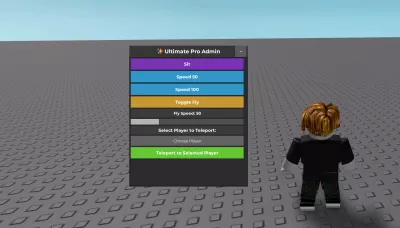
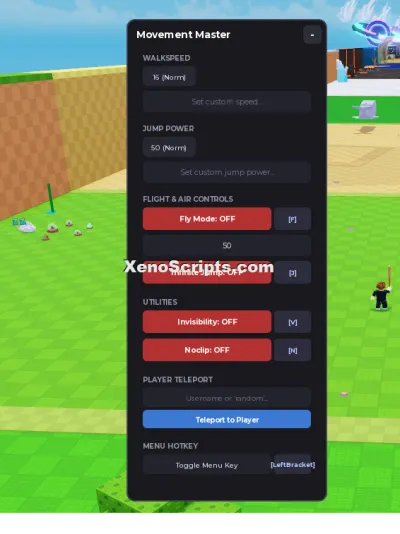
Ultimate Admin Panel for all games
6,805 views
Script was created by me and i explained how it works I will update this script and add more features You can also join my telegramm and ask me a question: t.me/exeXeno


--// Services
local Players = game:GetService("Players")
local LocalPlayer = Players.LocalPlayer
local RunService = game:GetService("RunService")
local UserInputService = game:GetService("UserInputService")
local TweenService = game:GetService("TweenService")

--// Variables
local flySpeed = 50
local flying = false
local flyBodyVelocity = nil
local flyBodyGyro = nil

--// Create GUI
local ScreenGui = Instance.new("ScreenGui", game.CoreGui)
ScreenGui.Name = "ProAdminGUI"

local Frame = Instance.new("Frame", ScreenGui)
Frame.Size = UDim2.new(0, 420, 0, 500)
Frame.Position = UDim2.new(0.05, 0, 0.1, 0)
Frame.BackgroundColor3 = Color3.fromRGB(35,35,35) -- Сделали фон видимым
Frame.BorderSizePixel = 0
Frame.Active = true
Frame.Draggable = true
Frame.ClipsDescendants = true
Frame.Name = "MainFrame"

-- Title Bar
local Title = Instance.new("TextLabel", Frame)
Title.Size = UDim2.new(1,0,0,40)
Title.Position = UDim2.new(0,0,0,0)
Title.BackgroundColor3 = Color3.fromRGB(55,55,55)
Title.Text = "✨ Ultimate Pro Admin"
Title.Font = Enum.Font.GothamBold
Title.TextSize = 22
Title.TextColor3 = Color3.fromRGB(255,255,255)

-- Close/Collapse Button
local CollapseBtn = Instance.new("TextButton", Frame)
CollapseBtn.Size = UDim2.new(0,40,0,40)
CollapseBtn.Position = UDim2.new(1,-45,0,0)
CollapseBtn.BackgroundColor3 = Color3.fromRGB(90,90,90)
CollapseBtn.Text = "–"
CollapseBtn.Font = Enum.Font.GothamBold
CollapseBtn.TextSize = 22
CollapseBtn.TextColor3 = Color3.fromRGB(255,255,255)

local collapsed = false
CollapseBtn.MouseButton1Click:Connect(function()
    collapsed = not collapsed
    local goalSize = collapsed and UDim2.new(0,420,0,40) or UDim2.new(0,420,0,500)
    local tween = TweenService:Create(Frame,TweenInfo.new(0.3),{Size = goalSize})
    tween:Play()
    CollapseBtn.Text = collapsed and "+" or "–"
end)

-- Scrollable Buttons Area
local ScrollingFrame = Instance.new("ScrollingFrame", Frame)
ScrollingFrame.Size = UDim2.new(1,-10,1,-50)
ScrollingFrame.Position = UDim2.new(0,5,0,45)
ScrollingFrame.BackgroundTransparency = 0.1 -- Сделали фон видимым
ScrollingFrame.BackgroundColor3 = Color3.fromRGB(45,45,45)
ScrollingFrame.ScrollBarThickness = 10

local UIListLayout = Instance.new("UIListLayout", ScrollingFrame)
UIListLayout.Padding = UDim.new(0,5)
UIListLayout.SortOrder = Enum.SortOrder.LayoutOrder

-- Function to create styled buttons
local function CreateButton(text, callback, color)
    local button = Instance.new("TextButton", ScrollingFrame)
    button.Size = UDim2.new(1, -10, 0, 40)
    button.BackgroundColor3 = color or Color3.fromRGB(80,80,80)
    button.Text = text
    button.Font = Enum.Font.GothamBold
    button.TextSize = 18
    button.TextColor3 = Color3.fromRGB(255,255,255)
    button.AutoButtonColor = true

    -- Hover Animation
    button.MouseEnter:Connect(function()
        TweenService:Create(button,TweenInfo.new(0.2),{BackgroundColor3 = Color3.fromRGB(120,120,120)}):Play()
    end)
    button.MouseLeave:Connect(function()
        TweenService:Create(button,TweenInfo.new(0.2),{BackgroundColor3 = color or Color3.fromRGB(80,80,80)}):Play()
    end)

    button.MouseButton1Click:Connect(callback)
    return button
end

-- Update Scroll Canvas
UIListLayout:GetPropertyChangedSignal("AbsoluteContentSize"):Connect(function()
    ScrollingFrame.CanvasSize = UDim2.new(0,0,0,UIListLayout.AbsoluteContentSize.Y + 10)
end)

--// Basic Commands
CreateButton("Sit", function()
    local hum = LocalPlayer.Character and LocalPlayer.Character:FindFirstChild("Humanoid")
    if hum then hum.Sit = true end
end, Color3.fromRGB(120,50,180))

CreateButton("Speed 50", function()
    local hum = LocalPlayer.Character and LocalPlayer.Character:FindFirstChild("Humanoid")
    if hum then hum.WalkSpeed = 50 end
end, Color3.fromRGB(50,150,200))

CreateButton("Speed 100", function()
    local hum = LocalPlayer.Character and LocalPlayer.Character:FindFirstChild("Humanoid")
    if hum then hum.WalkSpeed = 100 end
end, Color3.fromRGB(50,150,200))

--// Fly Command
CreateButton("Toggle Fly", function()
    local char = LocalPlayer.Character
    if not char then return end
    local hrp = char:FindFirstChild("HumanoidRootPart")
    local hum = char:FindFirstChild("Humanoid")
    if not hrp or not hum then return end

    flying = not flying
    if flying then
        flyBodyVelocity = Instance.new("BodyVelocity", hrp)
        flyBodyVelocity.MaxForce = Vector3.new(1e5,1e5,1e5)
        flyBodyVelocity.Velocity = Vector3.new(0,0,0)

        flyBodyGyro = Instance.new("BodyGyro", hrp)
        flyBodyGyro.MaxTorque = Vector3.new(1e5,1e5,1e5)
        flyBodyGyro.CFrame = hrp.CFrame

        RunService.RenderStepped:Connect(function()
            if flying then
                local cam = workspace.CurrentCamera
                local direction = (cam.CFrame.LookVector)
                flyBodyVelocity.Velocity = direction * flySpeed
                flyBodyGyro.CFrame = CFrame.new(hrp.Position, hrp.Position + cam.CFrame.LookVector)
            else
                if flyBodyVelocity then flyBodyVelocity:Destroy() end
                if flyBodyGyro then flyBodyGyro:Destroy() end
            end
        end)
    else
        if flyBodyVelocity then flyBodyVelocity:Destroy() end
        if flyBodyGyro then flyBodyGyro:Destroy() end
    end
end, Color3.fromRGB(200,150,50))

-- Fly Speed Slider
local SliderLabel = Instance.new("TextLabel", ScrollingFrame)
SliderLabel.Size = UDim2.new(1,-10,0,30)
SliderLabel.Text = "Fly Speed: " .. flySpeed
SliderLabel.TextColor3 = Color3.new(1,1,1)
SliderLabel.BackgroundColor3 = Color3.fromRGB(60,60,60)
SliderLabel.Font = Enum.Font.GothamBold
SliderLabel.TextSize = 16

local Slider = Instance.new("Frame", ScrollingFrame)
Slider.Size = UDim2.new(1,-10,0,20)
Slider.BackgroundColor3 = Color3.fromRGB(80,80,80)

local SliderHandle = Instance.new("Frame", Slider)
SliderHandle.Size = UDim2.new(flySpeed/200,0,1,0)
SliderHandle.BackgroundColor3 = Color3.fromRGB(180,180,180)

local dragging = false
SliderHandle.InputBegan:Connect(function(input)
    if input.UserInputType == Enum.UserInputType.MouseButton1 then dragging = true end
end)
UserInputService.InputEnded:Connect(function(input)
    if input.UserInputType == Enum.UserInputType.MouseButton1 then dragging = false end
end)
UserInputService.InputChanged:Connect(function(input)
    if dragging and input.UserInputType == Enum.UserInputType.MouseMovement then
        local mouseX = UserInputService:GetMouseLocation().X - Slider.AbsolutePosition.X
        mouseX = math.clamp(mouseX,0,Slider.AbsoluteSize.X)
        SliderHandle.Size = UDim2.new(mouseX/Slider.AbsoluteSize.X,0,1,0)
        flySpeed = math.floor((mouseX/Slider.AbsoluteSize.X)*200)
        SliderLabel.Text = "Fly Speed: " .. flySpeed
    end
end)

--// Player Teleport Dropdown
local DropdownLabel = Instance.new("TextLabel", ScrollingFrame)
DropdownLabel.Size = UDim2.new(1,-10,0,30)
DropdownLabel.Text = "Select Player to Teleport:"
DropdownLabel.TextColor3 = Color3.new(1,1,1)
DropdownLabel.BackgroundColor3 = Color3.fromRGB(60,60,60)
DropdownLabel.Font = Enum.Font.GothamBold
DropdownLabel.TextSize = 18

local PlayerDropdown = Instance.new("TextButton", ScrollingFrame)
PlayerDropdown.Size = UDim2.new(1,-10,0,35)
PlayerDropdown.Text = "Choose Player"
PlayerDropdown.Font = Enum.Font.Gotham
PlayerDropdown.TextSize = 16
PlayerDropdown.TextColor3 = Color3.new(1,1,1)
PlayerDropdown.BackgroundColor3 = Color3.fromRGB(100,100,100)
PlayerDropdown.BorderSizePixel = 0

local DropdownOpen = false
local DropdownFrame = Instance.new("Frame", ScrollingFrame)
DropdownFrame.Size = UDim2.new(1,-10,0,0)
DropdownFrame.Position = UDim2.new(0,0,0,0)
DropdownFrame.BackgroundTransparency = 0.1
DropdownFrame.BackgroundColor3 = Color3.fromRGB(70,70,70)
DropdownFrame.BorderSizePixel = 0
DropdownFrame.Visible = false

local function UpdateDropdown()
    for _, child in pairs(DropdownFrame:GetChildren()) do
        if child:IsA("TextButton") then child:Destroy() end
    end
    local yPos = 0
    for _, player in pairs(Players:GetPlayers()) do
        if player ~= LocalPlayer then
            local btn = Instance.new("TextButton", DropdownFrame)
            btn.Size = UDim2.new(1,-10,0,30)
            btn.Position = UDim2.new(0,0,0,yPos)
            btn.Text = player.Name
            btn.Font = Enum.Font.Gotham
            btn.TextSize = 16
            btn.TextColor3 = Color3.new(1,1,1)
            btn.BackgroundColor3 = Color3.fromRGB(120,120,120)
            btn.BorderSizePixel = 0
            btn.MouseButton1Click:Connect(function()
                PlayerDropdown.Text = player.Name
                DropdownFrame.Visible = false
                DropdownOpen = false
            end)
            yPos = yPos + 35
        end
    end
    DropdownFrame.Size = UDim2.new(1,-10,0,yPos)
end

PlayerDropdown.MouseButton1Click:Connect(function()
    DropdownOpen = not DropdownOpen
    DropdownFrame.Visible = DropdownOpen
    UpdateDropdown()
end)

-- Teleport Button
CreateButton("Teleport to Selected Player", function()
    local targetName = PlayerDropdown.Text
    local targetPlayer = Players:FindFirstChild(targetName)
    if targetPlayer and targetPlayer.Character and targetPlayer.Character:FindFirstChild("HumanoidRootPart") then
        local hrp = LocalPlayer.Character and LocalPlayer.Character:FindFirstChild("HumanoidRootPart")
        if hrp then
            hrp.CFrame = targetPlayer.Character.HumanoidRootPart.CFrame + Vector3.new(0,5,0)
        end
    end
end, Color3.fromRGB(100,200,50))

print("✨ Professional Admin GUI Loaded! Fly speed slider & dropdown teleport ready.")
Universal

Universal
Universal
Universal

Universal
Universal
Boosting rockets this script to #1 on the homepage. A free account takes 30 seconds.
Log inGrab boosts and rocket your favorite scripts to the top — plus join the booster wall with the RGB ring.
⚡ Go Pro — 10 boosts/month + zero adsIt jumps to #1 in Recent Scripts and your avatar joins the booster wall.


Comments (0)
Log in to add a comment.