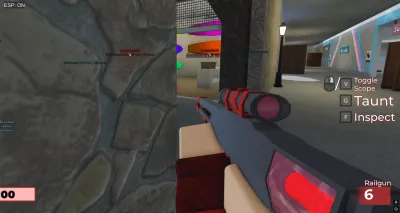
Universal ESP script
25,099 views
Universal ESP with team check. GUI is just a button you click to toggle on or off, pretty simplistic.


-- // Dynamic Hitbox ESP + Distance Transparency + Smooth Fade + Camera Lag Fix
-- // Works in executors

local Players = game:GetService("Players")
local RunService = game:GetService("RunService")
local LocalPlayer = Players.LocalPlayer
local Camera = workspace.CurrentCamera
local UserInputService = game:GetService("UserInputService")

local espEnabled = true
local fadeSpeed = 0.15 -- Faster fade so it catches up quickly
local maxTransparency = 0.35 -- Max opacity for close players (35%)
local maxDistance = 1000 -- Studs where ESP becomes fully transparent

-- Distance transparency mapping
local function distanceTransparency(distance)
    local t = math.clamp(1 - (distance / maxDistance), 0, 1)
    return maxTransparency * t
end

-- Function to check if player is visible (head OR torso)
local function isVisible(character)
    local head = character:FindFirstChild("Head")
    local torso = character:FindFirstChild("HumanoidRootPart")
    if head then
        local _, vis = Camera:WorldToViewportPoint(head.Position)
        if vis then return true end
    end
    if torso then
        local _, vis = Camera:WorldToViewportPoint(torso.Position)
        if vis then return true end
    end
    return false
end

-- Create ESP for a player
local function createESP(player)
    local box = Drawing.new("Square")
    box.Thickness = 1
    box.Filled = false
    box.Transparency = 0
    box.Visible = false

    local text = Drawing.new("Text")
    text.Size = 16
    text.Center = true
    text.Outline = true
    text.Font = 2
    text.Transparency = 0
    text.Visible = false

    local alpha = 0

    local connection
    connection = RunService.RenderStepped:Connect(function()
        if espEnabled
        and player
        and player.Character
        and player.Character:FindFirstChild("HumanoidRootPart")
        and player.Character:FindFirstChild("Humanoid")
        and LocalPlayer.Character
        and LocalPlayer.Character:FindFirstChild("HumanoidRootPart") then

            local rootPart = player.Character.HumanoidRootPart
            local humanoid = player.Character.Humanoid
            local distance = (rootPart.Position - LocalPlayer.Character.HumanoidRootPart.Position).Magnitude
            local health = math.floor(humanoid.Health)
            local color = player.Team and player.TeamColor.Color or Color3.fromRGB(255,255,255)

            if isVisible(player.Character) then
                local targetAlpha = distanceTransparency(distance)
                if targetAlpha > alpha then
                    alpha = math.min(alpha + fadeSpeed, targetAlpha)
                else
                    alpha = math.max(alpha - fadeSpeed, targetAlpha)
                end

                local modelSize = player.Character:GetExtentsSize()
                local hrpCF = rootPart.CFrame

                local topLeft = Camera:WorldToViewportPoint((hrpCF * CFrame.new(-modelSize.X/2, modelSize.Y/2, 0)).Position)
                local bottomRight = Camera:WorldToViewportPoint((hrpCF * CFrame.new(modelSize.X/2, -modelSize.Y/2, 0)).Position)

                box.Color = color
                box.Position = Vector2.new(topLeft.X, topLeft.Y)
                box.Size = Vector2.new(bottomRight.X - topLeft.X, bottomRight.Y - topLeft.Y)
                box.Transparency = alpha
                box.Visible = alpha > 0

                local headPos = Camera:WorldToViewportPoint(player.Character.Head.Position)
                text.Color = color
                text.Position = Vector2.new(headPos.X, topLeft.Y - 15)
                text.Text = string.format("[%s] | HP: %d | %d studs", player.Name, health, math.floor(distance))
                text.Transparency = alpha
                text.Visible = alpha > 0
            else
                alpha = math.max(alpha - fadeSpeed, 0)
                box.Visible = alpha > 0
                text.Visible = alpha > 0
                box.Transparency = alpha
                text.Transparency = alpha
            end
        else
            alpha = math.max(alpha - fadeSpeed, 0)
            box.Visible = alpha > 0
            text.Visible = alpha > 0
            box.Transparency = alpha
            text.Transparency = alpha
        end
    end)

    player.AncestryChanged:Connect(function(_, parent)
        if not parent then
            box:Remove()
            text:Remove()
            connection:Disconnect()
        end
    end)
end

-- Apply ESP to all players
for _, player in ipairs(Players:GetPlayers()) do
    if player ~= LocalPlayer then
        if player.Character then
            createESP(player)
        end
        player.CharacterAdded:Connect(function()
            task.wait(1)
            createESP(player)
        end)
    end
end
Players.PlayerAdded:Connect(function(player)
    if player ~= LocalPlayer then
        player.CharacterAdded:Connect(function()
            task.wait(1)
            createESP(player)
        end)
    end
end)

-- Toggle Button (Mobile & PC)
local ScreenGui = Instance.new("ScreenGui")
ScreenGui.Parent = game.CoreGui

local Button = Instance.new("TextButton")
Button.Parent = ScreenGui
Button.Size = UDim2.new(0, 90, 0, 30)
Button.Position = UDim2.new(0.05, 0, 0.05, 0)
Button.BackgroundColor3 = Color3.fromRGB(40, 40, 40)
Button.TextColor3 = Color3.fromRGB(255, 255, 255)
Button.Text = "ESP: ON"
Button.TextScaled = true
Button.BackgroundTransparency = 0.3
Button.BorderSizePixel = 0

-- Dragging
local dragging, dragStart, startPos
local function update(input)
    local delta = input.Position - dragStart
    Button.Position = UDim2.new(startPos.X.Scale, startPos.X.Offset + delta.X, startPos.Y.Scale, startPos.Y.Offset + delta.Y)
end

Button.InputBegan:Connect(function(input)
    if input.UserInputType == Enum.UserInputType.MouseButton1 or input.UserInputType == Enum.UserInputType.Touch then
        dragging = true
        dragStart = input.Position
        startPos = Button.Position
        input.Changed:Connect(function()
            if input.UserInputState == Enum.UserInputState.End then
                dragging = false
            end
        end)
    end
end)

Button.InputChanged:Connect(function(input)
    if input.UserInputType == Enum.UserInputType.MouseMovement or input.UserInputType == Enum.UserInputType.Touch then
        if dragging then update(input) end
    end
end)

UserInputService.InputChanged:Connect(function(input)
    if dragging and (input.UserInputType == Enum.UserInputType.MouseMovement or input.UserInputType == Enum.UserInputType.Touch) then
        update(input)
    end
end)

-- Toggle ESP
Button.MouseButton1Click:Connect(function()
    espEnabled = not espEnabled
    Button.Text = espEnabled and "ESP: ON" or "ESP: OFF"
end)
Universal

Universal
Universal
Universal

Universal
Universal
Boosting rockets this script to #1 on the homepage. A free account takes 30 seconds.
Log inGrab boosts and rocket your favorite scripts to the top — plus join the booster wall with the RGB ring.
⚡ Go Pro — 10 boosts/month + zero adsIt jumps to #1 in Recent Scripts and your avatar joins the booster wall.


Comments (1)
Log in to add a comment.
teasdasd29930
4 months ago
working